Instant Quick Look (Space)
Press Space to preview images (EXIF HUD), video (VLC accelerated), audio waveforms, PDF documents via self-hosted PDF.js, syntax-highlighted code, and archive directory trees.
A fast, keyboard-first Windows file manager built with Node.js and Electron. Combines the best ergonomics of macOS Finder — Quick Look, Miller Columns, and Colored Tags — with the native power of Windows, resolving the performance bottlenecks and layout flaws of both platforms.
Press Space to preview images (EXIF HUD), video (VLC accelerated), audio waveforms, PDF documents via self-hosted PDF.js, syntax-highlighted code, and archive directory trees.
Windows 11 native Acrylic material integration (backgroundMaterial: 'acrylic') with optical depth layers, specular glare tracking, and an accessibility mode for low-spec machines.
Split your workspace with Ctrl+Shift+D, open tabs with Ctrl+T, or spawn independent windows with Ctrl+N. Cross-pane drag-and-drop with instant drive jumping.
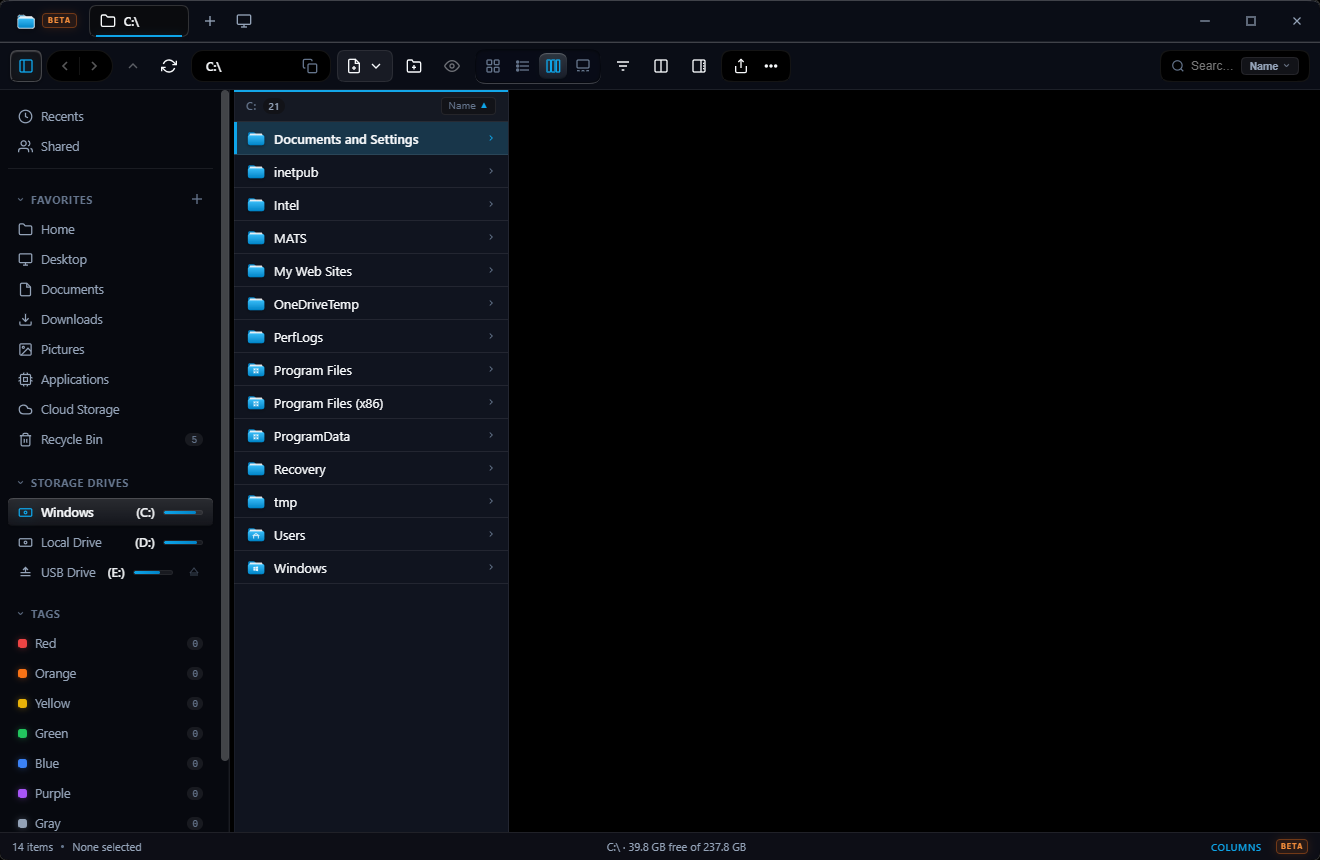
Visual Interface Tour
Design Philosophy
Ctrl+L / Alt+D navigation.
Ctrl+Shift+D) and multi-window spawning (Ctrl+N) built right in.
| Feature Capability | Windows 11 Explorer | macOS Sequoia Finder | MyFiles |
|---|---|---|---|
| Instant Quick Look (Space) | No (Third-party add-ons required) | Native | Instant (Multi-format + PDF.js + Code + Archives) |
| Miller Columns View | No | Native | Native with live preview & horizontal sync |
| Dual-Pane Split Workspace | No | No | Built-in (Ctrl+Shift+D) with drag-and-drop |
| Right-Click Context Menu Latency | 400–800 ms shell latency | ~100 ms | Instant (0 ms) |
| Editable Address Bar | Yes | Clunky dropdown modal | Instant (Ctrl+L / Alt+D + breadcrumbs) |
| Colored Tag Taxonomy | No | Native | 7-Color Tags with sidebar filters |
| Native Archive Inspection | Partial ZIP only | ZIP only | ZIP, 7Z, RAR, TAR, GZ, BZ2, XZ, CAB, ISO |
| Local Wi-Fi QR Mobile Transfer | Cloud OneDrive only | AirDrop (Apple ecosystem only) | Any Phone (iOS & Android) via Wi-Fi QR |
| Cryptographic Deduplication | No | No | 2-Phase SHA-256 with safe deletion |
| Batch PowerRename | PowerToys add-on only | Basic sequential rename | Built-in with regex, variables & live diff |
| Disk Treemap & Temp Cleaner | No | No | Interactive treemap + %TEMP% cleaner |
| Status Bar Disk Gauge | Hidden in sub-menus | Minimal | Persistent Free Space / Item / Selection stats |
| Browser / Mobile Web Server Mode | No | No | Built-in via server.js (port 5241) |
| Multi-Window Desktop Support | Yes | Yes | Built-in (Ctrl+N & tab drag-out) |
| RAM Footprint (Baseline) | 250–500 MB | 150–300 MB | 120–180 MB (Zero Framework Overhead) |
Capabilities
Grid view with 4-step gear slider, List view with virtual scrolling, Miller Columns for hierarchical traversal, and Gallery view with carousel scrubbing.
Instant Spacebar preview for images, hardware-accelerated video via VLC/media-stream, audio waveforms, PDF.js, and ZIP/7z/RAR archive inspection.
Windows 11 Acrylic material (backgroundMaterial: 'acrylic') with specular glare tracking on pointer movement and frosted glass dialogs.
Asynchronous storage metrics via fs.promises.statfs with 4-second TTL drive caching and throttled background subfolder counting queues.
Real-time file attributes, image dimensions, word counts, copyable metadata, aggregate folder sizes, and type breakdown chips.
Full tab management (Ctrl+T, Ctrl+W), dual-pane split workspace (Ctrl+Shift+D), and multi-window spawning (Ctrl+N).
Built-in 2-phase SHA-256 duplicate detection engine to identify redundant files across drives with safe review and deletion.
Regex-powered batch renamer with real-time substitution preview, sequential numbering, and case transformation.
Windows Share Hub with local Wi-Fi QR codes for direct file downloads to mobile phones on the same local network without cloud uploads.
Universal Preview
Tap Space on any file to open the centered modal. Cycle through items with Arrow keys without dismissing.
| Category | File Extensions | Engine & Capabilities |
|---|---|---|
| Images | .png, .jpg, .webp, .gif, .svg, .bmp, .ico, .tiff, .avif | Hardware canvas decoding, 90° rotation, horizontal flip (H), zoom, and floating glass EXIF HUD (I) |
| Video | .mp4, .webm, .mov, .mkv, .avi, .m4v | Native streaming via media-stream:// with HTTP 206 byte-range seeking, plus VLC direct passthrough |
| Audio | .mp3, .wav, .ogg, .m4a, .flac, .aac | Waveform player card with duration counter and seeking controls |
| PDF Documents | .pdf | Bundled self-hosted PDF.js engine with page navigation, dark mode invert, zoom fit, and hand pan (H) |
| Office Documents | .docx, .xlsx, .pptx, .docm, .xlsm | Fast metadata extractor and structured text excerpt display |
| Code & Data | .js, .ts, .py, .rs, .go, .c, .cpp, .cs, .java, .html, .css, .json, .yaml, .sql, .sh, .ps1 | Monospace syntax preview with line numbers, in-doc search (Ctrl+F), and copy to clipboard |
| Markdown | .md, .markdown | Rendered HTML preview with headings, fenced code blocks, tables, and lists |
| Archives | .zip, .7z, .rar, .tar, .gz, .bz2, .xz, .cab, .iso | Internal file paths, compressed/uncompressed sizes, and compression ratio without extracting |
| Directories | Folders & Junction Points | Item count, subfolder tally, file list table, and one-click "Open Folder" action |
Keyboard-First Controls
Designed so you rarely have to lift your fingers off the keyboard.
| Shortcut | Context | Action |
|---|---|---|
| Space | Global | Open or dismiss Quick Look centered preview |
| Arrow Keys | Global / Preview | Navigate files or cycle active preview targets |
| Enter | File List | Open file with default Windows handler / enter folder |
| Ctrl + N | Global | Spawn new independent MyFiles desktop window |
| Ctrl + T | Global | Open new browser-style folder tab |
| Ctrl + W | Global | Close active folder tab |
| Ctrl + Shift + D | Global | Toggle dual-pane split workspace view |
| Ctrl + 1 · 2 · 3 · 4 | Global | Switch view modes: Grid · List · Miller Columns · Gallery |
| Ctrl + F | Global | Focus live search bar with real-time streaming results |
| Ctrl + L / Alt + D | Global | Focus editable breadcrumb address bar |
| Alt + Up | Global | Navigate to parent directory hierarchy |
| Alt + Left / Alt + Right | Global | History back / forward navigation |
| Ctrl + Shift + N | Global | Create new folder instantly |
| F2 | File List | Inline rename for selected item |
| Ctrl + D | File List | Duplicate selected file or folder |
| Delete | File List | Move selected item(s) safely to Windows Recycle Bin |
| Shift + Delete | File List | Permanently delete selected item(s) with prompt |
| Ctrl + C / X / V | File List | Standard Copy, Cut, and Paste clipboard operations |
| Ctrl + Z / Ctrl + Y | Global | Undo / Redo filesystem modifications |
| F | Quick Look | Toggle full-window Quick Look maximization |
| I | Quick Look | Toggle EXIF and media metadata HUD overlay |
| F5 / Ctrl + R | Global | Force refresh active directory and storage metrics |
| Esc | Global | Dismiss modal, context menu, or Quick Look overlay |
Workflows
Highlight any file, tap Share Hub, and point any iPhone or Android camera at the screen QR code. Download initiates over LAN Wi-Fi at raw local router speed without internet data consumption.
Scan multi-gigabyte disks in seconds. Phase 1 filters candidates by byte size without reading blocks. Phase 2 cryptographically hashes matching pairs and moves duplicates safely to the Recycle Bin.
Spacebar opens native media-stream:// range streaming. For heavy or exotic codecs, tap Play in VLC for immediate GPU-accelerated video decoding without external transcode delay.
Systems Architecture
MyFiles operates under a dual runtime architecture: the UI runs either as an Electron desktop window with secure context isolation, or headless via Node.js HTTP range-streaming for local network access.
myfiles/
├── main.js                  # Electron main process — window lifecycle, IPC handlers, protocol streams
├── preload.js               # Context-isolated bridge exposing window.myFilesAPI safely
├── server.js                # Standalone Node.js HTTP server (web mode & mobile QR share)
├── fs-engine.js             # Unified filesystem engine — non-blocking statfs, caching, search
├── archive.js               # Archive inspection, extraction, and compression (7-Zip + bsdtar)
├── dedup.js                 # 2-phase SHA-256 duplicate detection engine
├── storage.js               # Storage analytics, temp directory cleaner, Recycle Bin metrics
├── vlc.js                   # VLC media player IPC bindings
├── src/
│   ├── index.html           # Unified DOM layout, modals, context menus, and toolbars
│   ├── styles.css           # Liquid Glass design system, CSS tokens, responsive typography
│   ├── renderer.js          # Core client controller — views, selection, drag & drop, Quick Look
│   └── vendor/pdfjs/        # Self-hosted PDF.js engine (zero external CDN dependency)
├── docs/
│   └── GITHUB_RELEASES_GUIDE.md # Complete GitHub Releases & CI/CD guide
└── test/
    └── self-check.js        # Built-in 61-suite automated verification engine
Local Web Server API
When running headless via server.js, MyFiles exposes a complete JSON API for local browsers and network devices.
| Endpoint | Method | Parameters | Description |
|---|---|---|---|
/api/drives | GET | — | Returns array of mounted logical drives with storage metrics |
/api/readdir | GET | ?path=<path> | Lists directory contents with file stats and metadata |
/api/file-content | GET | ?path=<path>&maxBytes=<n> | Fetches text snippet or media URL for Quick Look |
/api/raw-file | GET | ?path=<path> | Serves raw binary file data with correct MIME headers |
/api/stream | GET | ?path=<path> | HTTP 206 Partial Content byte-range video/audio stream |
/api/download | GET | ?path=<path> | Initiates direct file attachment download |
/api/search | GET | ?path=<path>&q=<q>&content=1 | Performs async recursive filename or text-grep search |
/api/recycle-bin | GET | — | Returns items currently in Windows Recycle Bin |
/api/recycle-bin/restore | POST | { "path": "<itemPath>" } | Restores an item from the Recycle Bin to original path |
/api/recycle-bin/empty | POST | — | Empties the Windows Recycle Bin securely |
Security & Sandboxing
contextIsolation: true and nodeIntegration: false. All filesystem operations require validated IPC channels in preload.js.
server.js normalize all requested paths, blocking escape sequences (../) and invalid drive roots.
192.168.x.x or 127.0.0.1) and never opens UPnP router ports to the public internet.
Downloads & Builds
Standard Windows installer with automatic desktop and start menu shortcuts, uninstaller, and file association support.
Single portable executable with zero installation footprint. Store on a flash drive and launch immediately on any Windows 10/11 machine.
# 1. Clone & install dependencies
git clone https://github.com/thesatyamjain/myfiles.git
cd myfiles && npm install
# 2. Run in Desktop Electron Mode
npm start
# 3. Run in Standalone Web Server Mode (port 5241)
npm run server
# → Open http://localhost:5241 or mobile Wi-Fi address
# 4. Build Windows Installers via electron-builder
npm run build:installer # Produces dist/MyFiles-Setup-1.1.1.exe
npm run build:portable # Produces dist/MyFiles-Portable-1.1.1.exe
# 5. Run Automated Test Suite (61 tests)
npm test
Operating Flow
01 · Launch
Launch as an independent desktop window with Acrylic depth or headless web server.
02 · Browse
Glide between Miller columns, zoomable cards, and sticky-header detail tables.
03 · Preview
Inspect PDFs, code syntax, video, audio waveforms, and ZIP archives instantly.
04 · Operate
Split screens with Ctrl+Shift+D, batch-rename, deduplicate, and share via QR.